HourLife 1.5: Care, Memoir and Ventures
HourLife 1.5 adds three modules: Care, for your doctors, visits and the questions to ask; Memoir, for writing your life a moment at a time; and Ventures, for testing a side business as a bet. Projects collect ideas, and tasks can be due sometime this week.
-
 HourLife
- Release
- v1.5
- The HourLife team
- 5 min read
HourLife 1.5 is available for iPhone and Mac.
What changed
- Care: your doctors, your visits, and the questions to ask at each one.
- Memoir: write your life, or someone else’s, a moment at a time, and export it as a book.
- Ventures: test a side business as a bet, with a budget and a day to decide.
- Ideas in Projects: collect words and pictures for a project, and make a task from any of them.
- Tasks can be due sometime this week or sometime this month.
- Daily supplements in Health, with a Taken button on the reminder.
- Hide, show and reorder the sections of Today.
- Search keeps up as you type.
- Fixed a crash at launch on some iPhones running iOS 26.
Care: go in with your questions
Most of us remember the question we meant to ask the doctor in the car on the way home. Care is for the time before and after a visit.
Add your doctors, then a visit. Before you go, write down what you want to ask; a question you didn’t get to last time is offered again under Still to ask. HourLife also suggests things worth mentioning from what you have logged, such as a blood pressure that has run higher lately. In the room, tick each question as it is covered and write the answer beside it.
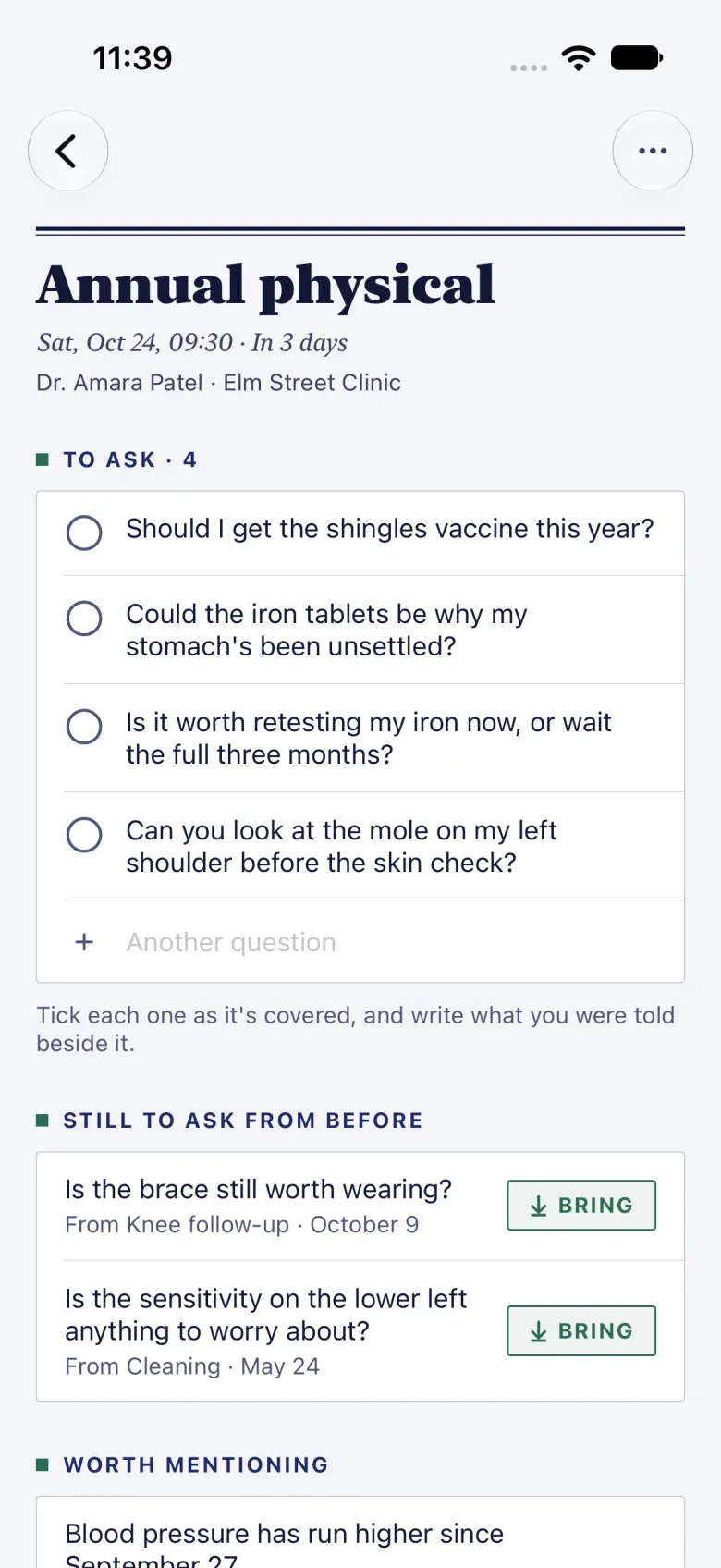
Afterwards, keep the papers and the medicines from the visit with it, and turn anything you need to do into a Care to-do, which shows in Tasks with the doctor’s name beside it. A visit can remind you before it starts.
Care keeps its records on your iPhone, like the rest of your health records, and never sends them through iCloud. A paired Mac reads them over your own Wi-Fi, and shows your visits on its calendar.
Memoir: your life, in your words
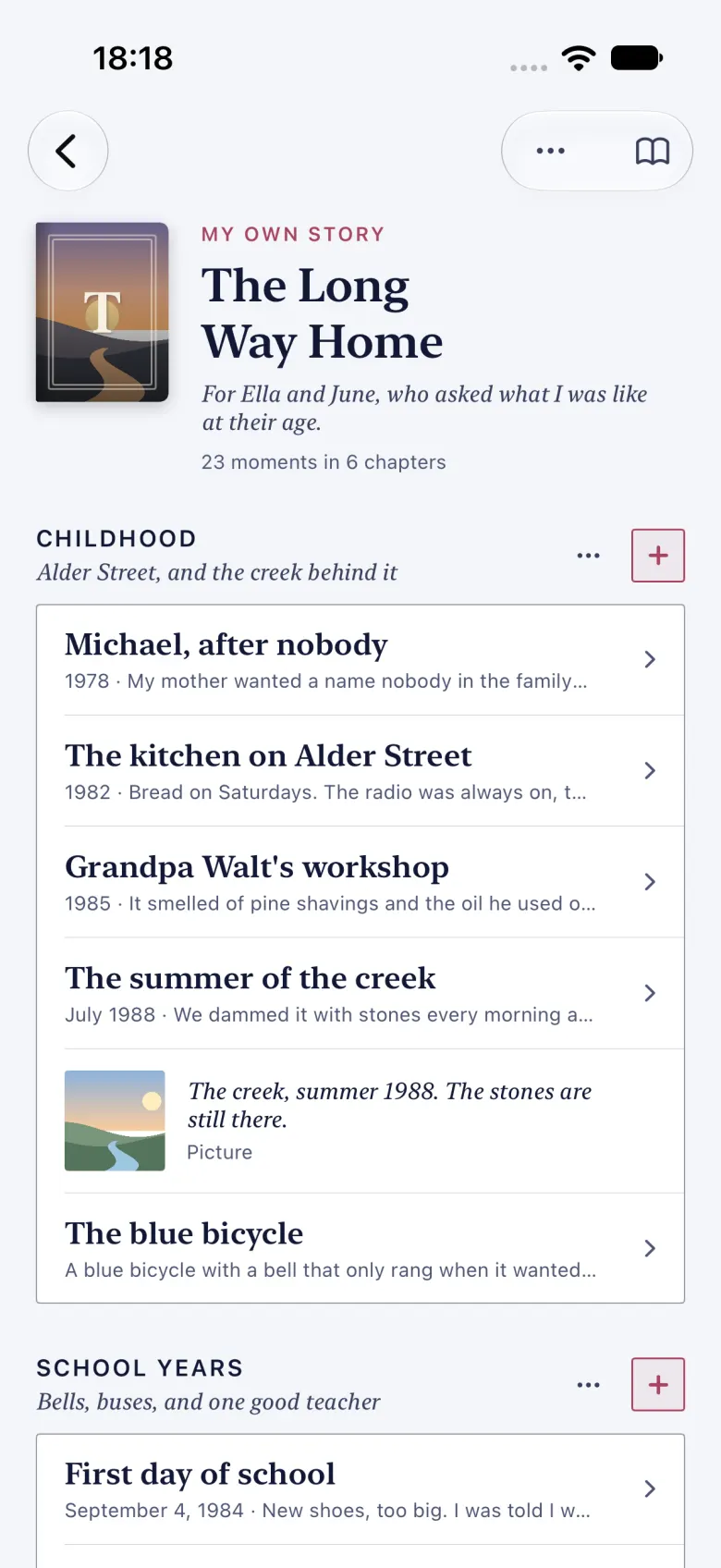
A life story is too big to sit down and write. A moment isn’t: the kitchen on a Saturday morning, the summer you dammed the creek. Memoir lets you write one at a time, give each a date, add a picture, and file it in a chapter. When a chapter is empty, HourLife offers a question to start it.
A book can be your own story or someone else’s, written for your children or about a parent. Open it in the reader and it reads like a book, with a cover and chapter openers. When you’re ready, export it as a book to read, or as plain text. On the Mac, Memoir has a shelf of its own, and each chapter opens in the Markdown editor.
Memoir is part of HourLife Premium.
Ventures: a side business, as a bet
Most side projects don’t fail; they drift. Ventures treats each way of earning as a bet you can lose on purpose: what you expect to happen, the revenue that would prove it, how many hours and how much money you will spend finding out, and the day you will decide.
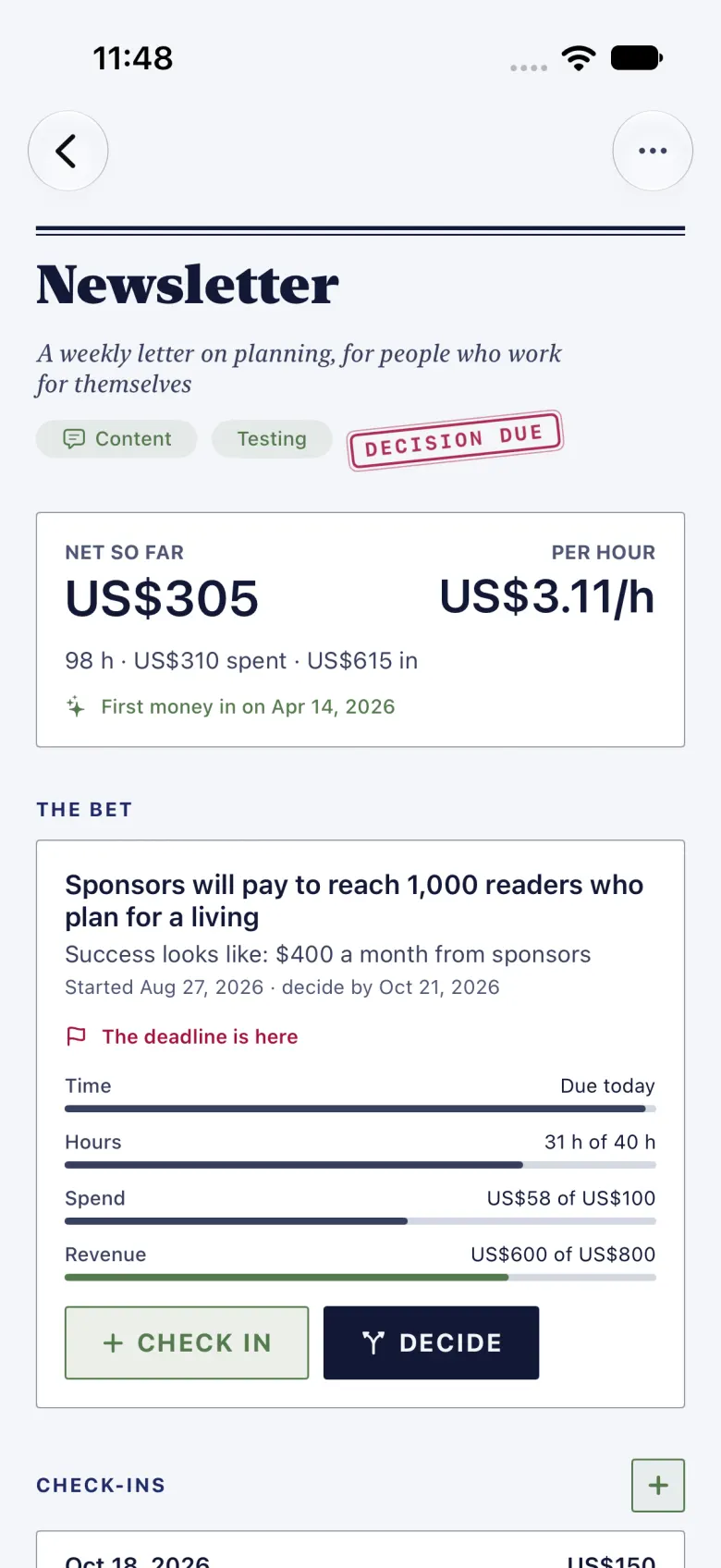
Check in as you go with the hours, the spend and the revenue. When the deadline arrives or a budget runs out, the bet asks you to choose: kill it, continue, scale it, pivot or keep it steady, and the choice is saved in Decisions with the rest of your decisions. Today shows the bets still running, with the days left and the budget closest to its limit. Any Pursuit can become a venture, and Ventures works on iPhone and Mac.
Ventures is part of HourLife Premium.
Ideas in Projects
A project now has a place for ideas: notes and pictures, written as freely as you like. When one turns into something to do, choose Make Task and it becomes a task in the project, with a link back to the idea. You can also turn a capture in Brain Dump into a project idea.
The projects page also marks a project that has gone quiet, when nothing in it has moved for a month. It is only a hint; nothing changes until you do.
Sometime this week
Not every task belongs on a day. In 1.5 a task can be due sometime this week, next week, this month or next month. It sits in a Sometime section in Tasks, and only turns overdue once the window has closed.
Health, every day
Add a daily supplement in Health and HourLife reminds you in the evening, with a Taken button right on the reminder. For a medicine you take as needed, it can remind you two hours later to rate how well it worked.
With a lot of reminders set, iOS only keeps the next 64. HourLife now keeps the soonest ones booked, so a reminder far down the list no longer goes missing.
Today, your way
The full Today page can now be arranged: hide the sections you don’t use, bring back the ones you do, and put them in your order, from Settings › Your Day. In the Journal, tapping a day on the calendar opens that day’s page over the month. The evening recap counts the thoughts you captured, and the quick panel hides Focus when there’s nothing in it.
On wider screens, the side panel now docks as a column beside the page instead of covering it.
On the Mac
HourLife for Mac 1.5 gets Ventures, Memoir, daily supplements and Care to-dos. You can reorder the widgets on Today and in the side panel from Settings, which now has tabs for Today, Sidebar, Side Panel and Modules. A habit can have any daily target, not just the preset minutes. Deleting a task asks first, and Today’s tasks and widgets have right-click menus.
Write it down before you need it: the question, the moment, the bet.
More from HourLife
HourLife 1.7: Calendar becomes a real calendar
HourLife 1.7 turns Calendar into a full calendar: events with alerts, alarms and repeats; Day, Week, Month, Year and List views; your Apple and Google calendars beside them; .ics import and export; and a Calendar widget.
HourLife
Release
v1.7
4 min read
HourLife 1.6: give your year a direction
HourLife 1.6 adds a year that starts on any date, with one word to return to, month plans that carry into your week, a wallpaper maker, flashcards on a spaced review schedule, subscriptions on a calendar, and a way to send us an idea and read our reply.
HourLife
Release
v1.6
6 min read