HourLife 1.9: your day on your wrist
HourLife 1.9 comes to Apple Watch: today’s habits, routines and tasks on your wrist, with habit timers and quick capture. Subscriptions remind you before a renewal, a trial’s end or a cancel-by date, and Household gives everything you own an upkeep job.
-
 HourLife
- Release
- v1.9
- The HourLife team
- 7 min read
HourLife 1.9 is available for iPhone, Mac and, for the first time, Apple Watch.
What changed
- HourLife on Apple Watch: today’s habits, routines and tasks on your wrist, with habit timers and quick capture.
- Subscriptions remind you before a renewal, a trial’s end or a cancel-by date, and handle manual renewals, longer cycles, one-time purchases and other currencies.
- Household gives each thing an upkeep job (service it, renew it, replace it) and reminds you when it’s due.
- From 26 December, New Year prompts help you look back on the year and begin the next.
- Choose HourLife’s language from its own Settings.
- Plus fixes and smaller improvements throughout.
Today, on your wrist
Most of what HourLife asks of you during the day is small: take the vitamins, drink the next glass, tick the routine, start the hour of deep work. None of it should need you to take out your phone. In 1.9 it doesn’t.
Open HourLife on your Apple Watch and you get today, the same today your iPhone shows: a Capture button, your intention for the day, then your habits, your routines and your tasks, with anything overdue in red. What you finish folds away under a “done” row at the bottom, so the list keeps getting shorter as the day goes on.
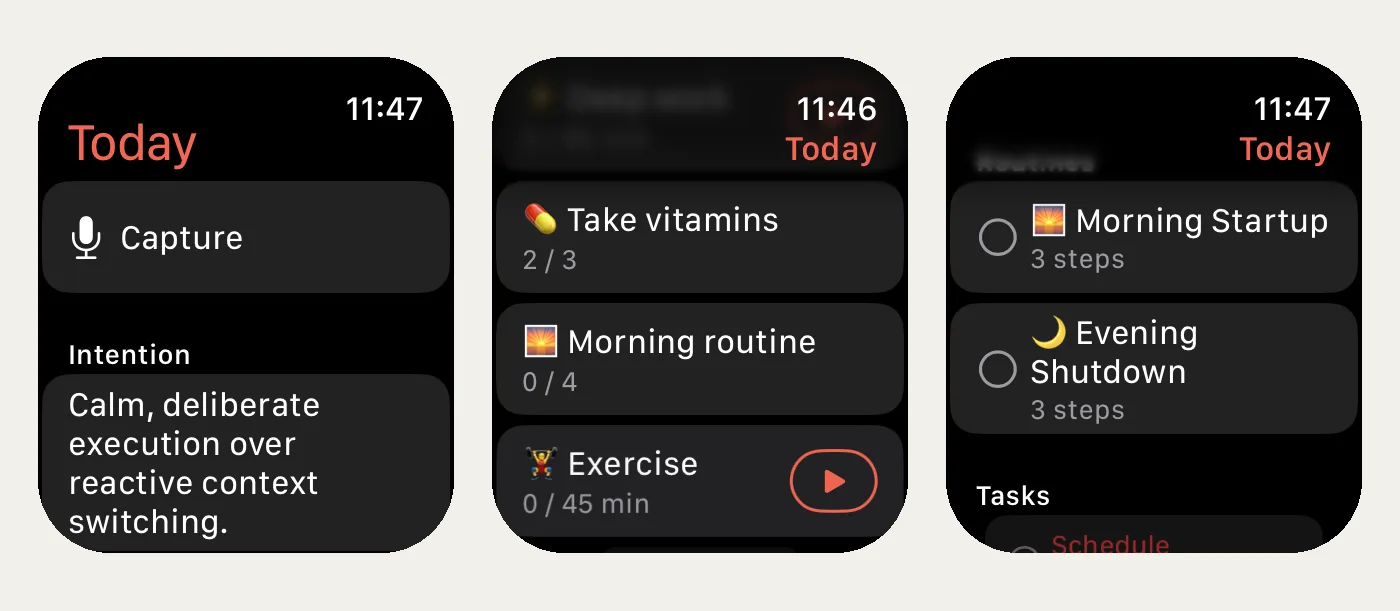
Every kind of habit works from the watch. Tap the circle to tick a simple one. A count, like glasses of water, has a +1 right on its row; open it to set the total with the Digital Crown or the quick amounts. A habit with checks through the day, morning, noon and evening, ticks one check at a time. Sets tick set by set. A minimum version, one push-up on a heavy day, is a swipe away. And a timed habit has a Start button: the timer runs on the watch, with Pause, Done and Discard, and tells you when the time is up.
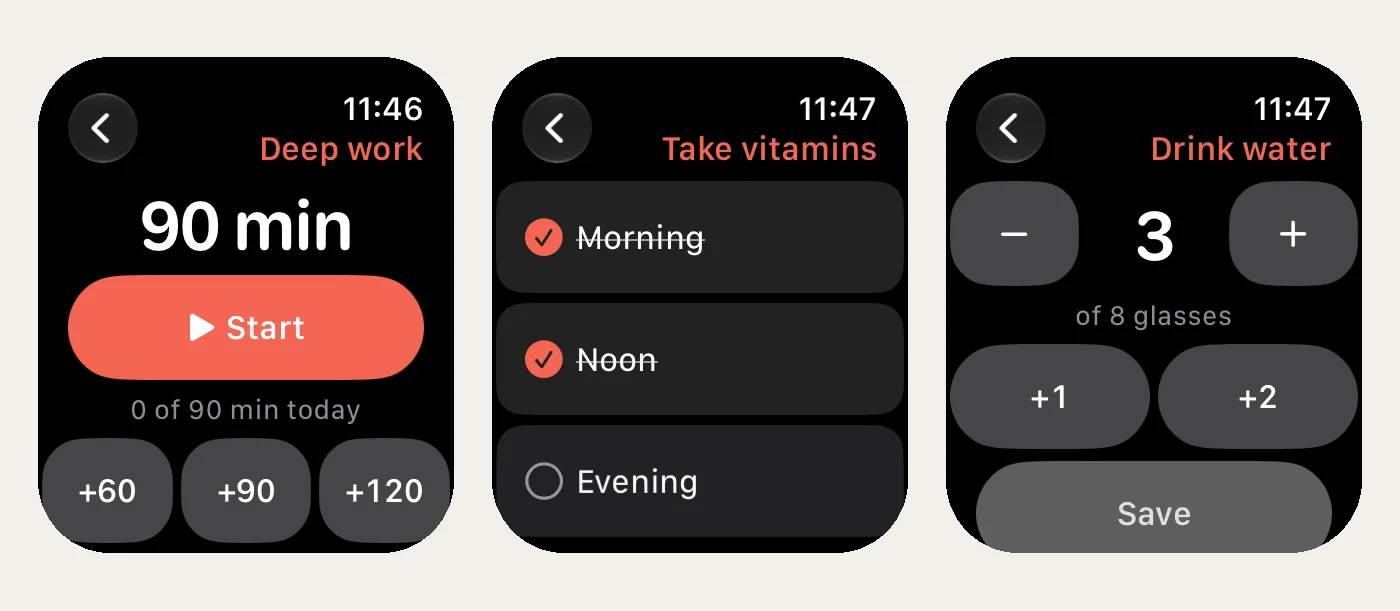
Capture takes dictation. Raise your wrist, tap, say the thought, and it lands in the Inbox on your iPhone, to sort out later. A habit you keep by writing a highlight can be kept the same way: say it, and it goes into Gratitude.
The watch keeps no records of its own. Everything you do there is sent to HourLife on your iPhone, which applies it the way it would a tap on the phone, and it syncs on from there as usual. That means the iPhone has the last word. If you try to tick a habit outside its time window, the watch says so (“Drink water wasn’t logged: only Morning.”) instead of pretending it worked. When the day ends, yesterday’s list leaves the watch, so a late tap can’t land on the wrong day.
The watch app comes with HourLife for iPhone and needs it: install HourLife on your iPhone, open it once, and HourLife appears on the watch. It shows your habits, tasks, routines and Inbox, and needs no Premium. Modules you have switched off, or that need Premium you don’t have, stay off the watch too.
Two smaller things came with it. A habit can now count Workout Minutes from Apple Health, from any workout app, the Watch’s own included, with overlapping workouts counted once. And if you log moods elsewhere, such as in the Watch’s Mindfulness app, Mood Settings ▸ Show moods from Apple Health lists them on that day in HourLife. They are read from Health each time and never copied.
Subscriptions that remind you
The subscriptions you forget about are the ones that cost the most: the free trial that quietly became a yearly plan, the service you meant to cancel before it renewed. Subscriptions in 1.9 is built to catch them.
Turn on Subscriptions ▸ … ▸ Reminders and HourLife tells you before each renewal, at 9 in the morning: a week before, three days, a day, or on the day, as you choose. Any subscription can have its own days. Give one a Trial ends or Cancel by date and it reminds you three days ahead, the day before and on the day: “Last day to cancel.” A weekly digest, off until you turn it on, sums up the next 30 days on the morning of your choice, and stays quiet when there is nothing to say.
- Manual renewals. Not everything renews itself: a parking permit, a domain you renew by hand. Turn off Renews automatically, and when the date passes the plan shows Needs renewal with a Mark renewed button that records the payment and moves to the next cycle. A plan billed on the 31st stays on the last day of each month: 31 January, 28 February, 31 March.
- Longer cycles and one-off purchases. Every 2 years, every 6 weeks, or One-time, which counts in what you’ve spent over the years but not in the monthly total.
- Other currencies. A subscription can be in any currency. Enter an exchange rate once, 1 EUR = 1.08 USD, and it counts in your totals; the rate syncs to your other devices. HourLife never looks rates up online.
- Cards that expire. Note which card pays for what, “Visa ··4242”, and when it expires. A month before, HourLife lists every service still charged to it, so you can update them before a payment fails.
- Into your budget. Give a subscription a budget category and its charges count toward that budget.
- Faster to add. Type a couple of letters and HourLife suggests the service, with its website and category filled in.
- Easier to see. A thin bar on each row shows how far the current cycle has run, amber in its last week. There is a Renews Soon widget, a search, a way to end or delete several at once, and Export CSV. Ask Siri “What renews this week in HourLife” for the week’s total.
Subscriptions lives in Finances, part of HourLife Premium.
Household: the upkeep nobody remembers
The smoke alarm that is ten years old. The car insurance that renews next month. The water heater you last flushed the year you moved in. Household in 1.9 keeps track of the upkeep that has a date, even when the date is years away.
Add a thing and say what kind it is: a vehicle, your home, a home system like the furnace, a safety device, an appliance, a first-aid kit, a policy or contract, a child’s car seat or helmet. HourLife suggests the jobs that usually come with it, each with a typical interval: an oil change every six months or 8,000 km for a car (left out for an electric one), test the smoke alarms, replace a CO alarm after seven years, renew the passport every ten. Switch on the ones you want and change any interval later.
Each job is one of four kinds:
- Maintain, every so often: service the furnace every year. A car’s jobs can also go by the odometer, whichever comes first: every 6 months or 8,000 km.
- Renew, by a date that comes round each year: registration, insurance, property tax.
- Expire, on a date: the medicine in the first-aid kit.
- Replace by age: the car seat, the roof, the water heater.
The due list reads the way you would say it: “Renew in 12 days”, “Expired 3 days ago”, “Replace by 2031 · 7 of 10 years”. A job reminds you ahead of time and again on the day, at 9 in the morning; renewals come 30 days ahead by default, a passport much earlier. Household Settings ▸ Due reminders turns them all off.
Household is part of HourLife Premium.
A new year, looked back on
From 26 December to 15 January, HourLife offers six questions about the year that is ending. What was the best day of 2026? Who made 2026 better? What are you glad you let go of? What do you want to carry into 2027? They appear on Today and on the Year page, and in the look-back step of Begin your year, where a tap starts your answer. Then begin the next year in the same place. They are free, and they come in all six languages.
Your language, from Settings
HourLife has spoken six languages since 1.8, following your iPhone’s. Settings ▸ Language now shows which one it is using and takes you straight to the page where you can choose another for HourLife alone. On the Mac, it is under Settings ▸ General.
On the Mac
HourLife for Mac 1.9 has the new Subscriptions: Mark Renewed for manual renewals, longer cycles and one-time purchases, other currencies with your own exchange rates, the website and card each service uses, its budget category, and a CSV export. When your last two payments for a service differ, the Mac offers to update its price. Household shows each thing’s jobs and when they are due, and you can complete them there; the reminders themselves come from your iPhone. And Settings shows your language too.
The small things, kept: now from your wrist.
More from HourLife
HourLife 1.8: five more languages, and a life outside the app
HourLife 1.8 speaks German, French, Spanish, Japanese and Brazilian Portuguese. Timers move to the Lock Screen, your history comes in from Reminders, Todoist, TickTick, Streaks and Day One, and Goals gets a board for the whole year.
HourLife
Release
v1.8
7 min read
HourLife 1.7: Calendar becomes a real calendar
HourLife 1.7 turns Calendar into a full calendar: events with alerts, alarms and repeats; Day, Week, Month, Year and List views; your Apple and Google calendars beside them; .ics import and export; and a Calendar widget.
HourLife
Release
v1.7
4 min read