I don't have one life. I have five — and each gets exactly one line
Single-priority purity feels like a monastery; to-do lists are ten backlogs in a trench coat. One gives up to five areas of your life a single slot each. To place something new, what is there must leave. Here is what a month of that did.
-
 One
One
- Product story
- Devon
- 7 min read
Every productivity philosophy fails at one of two extremes.
The first is monastic single-tasking: pick the one thing for your entire life and ignore everything else. It sounds noble in an essay. In real life, you have a job, a body, people you love, ideas you want to explore, and a stack of books on your nightstand. You cannot tell your spouse or your health that they don't exist this quarter because you're focused on a software launch.
The second extreme is what ninety percent of us actually end up doing: we open a task manager and create a list for every single area of life. A Work list (34 items), a Health list (8 items), a Relationships list (11 items), a Someday list (62 items). Adding to a list is free, so nothing ever stops you from adding. But taking something off requires actual time and energy. Within two months, your task manager is not a plan — it is an open invoice of guilt from your past self.
One is the honest middle between monastic purity and backlog hell: up to five areas of your life, each holding exactly one slot, and each slot holding exactly one line.
Five slots, and no more
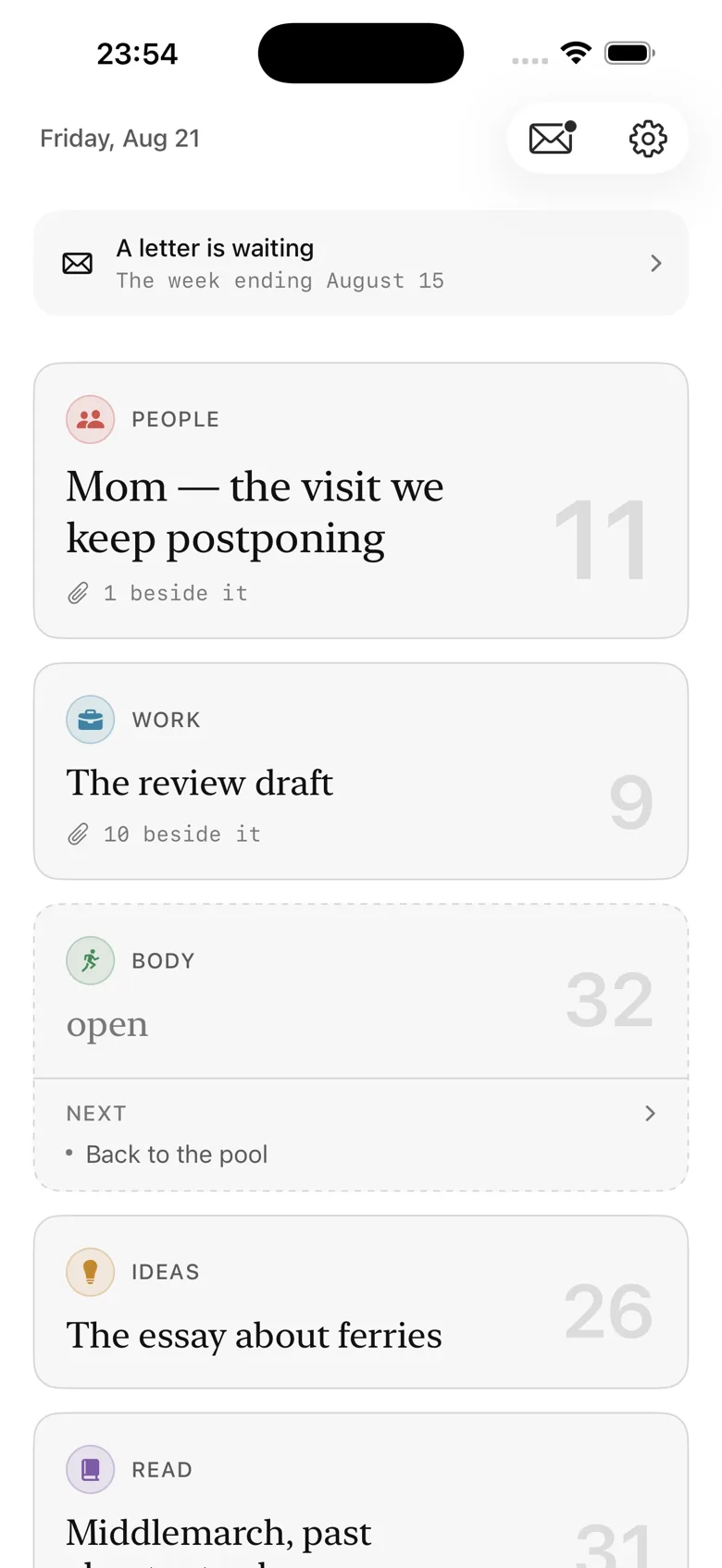
When you set up One, you name up to five areas. Mine are: Work, People, Body, Ideas, Read. (The app suggests starters like Craft, Health, Question, Place, but you write whatever words match your life.)
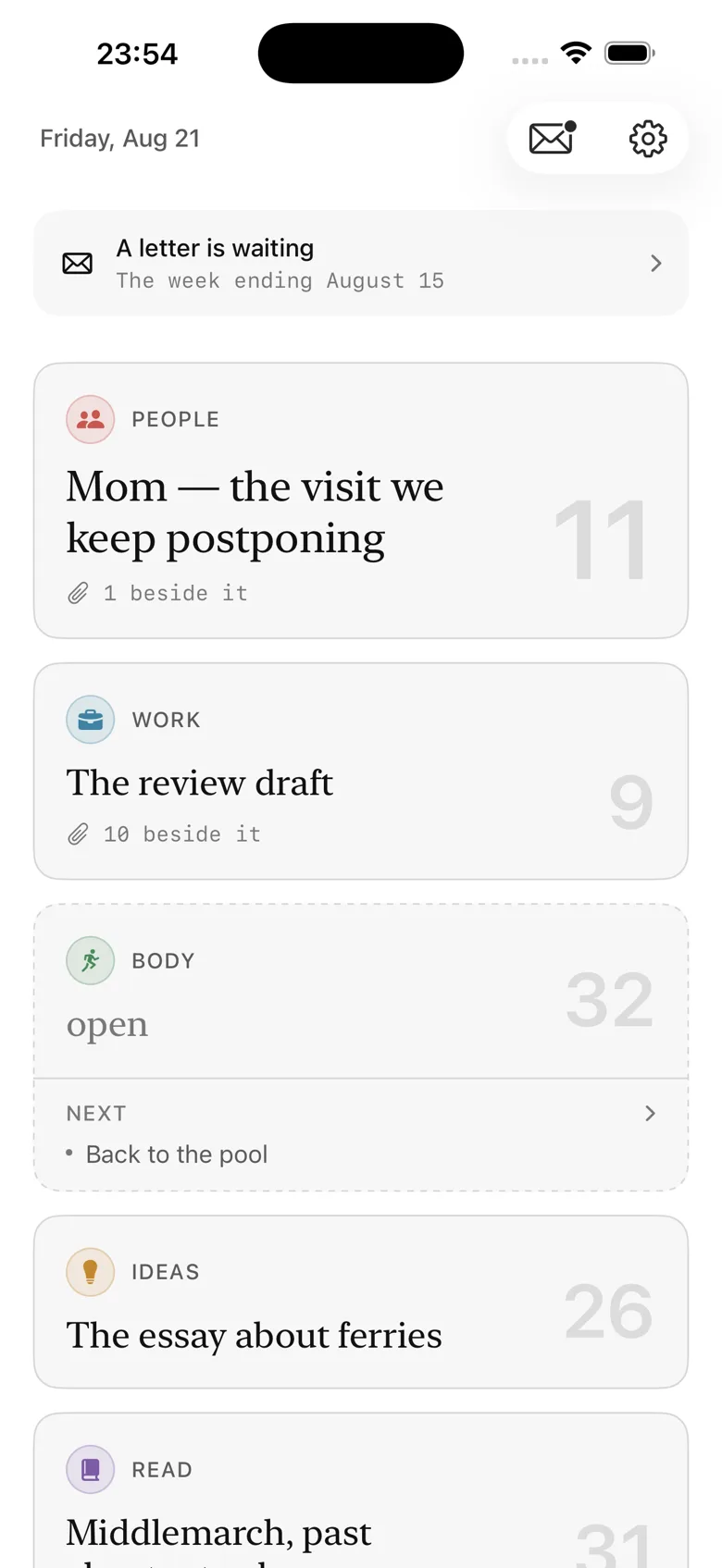
Each area gets a single card on the home screen. That card holds one line — your own words, describing the one thing you are actually carrying in that area right now.
Not a project. Not a sub-checklist. One line:
- Work: Ship the pricing memo and defend the tiers.
- People: Mom — the visit we keep postponing.
- Body: Zone 2 running, 45 minutes, three mornings.
- Ideas: The essay on why idea lists become graveyards.
- Read: The Overstory — 30 pages before bed.
That’s it. That is the whole front page.
And here is the rule that does the work: the cap is five. Five is not a default with a slider in Settings. It is hardcoded into the mechanism. If you want a sixth area, you have to retire an existing one. Why? Because a limit you can raise in Settings is a limit that gets raised the first afternoon you feel busy, and six areas quickly turns back into ten lists in a trench coat.
Keeping material beside the line
One line on the front screen sounds terrifying until you see how the app handles depth.
When you tap into a card, you can keep material beside that one intention — written notes, photos, scanned pages, or PDFs.
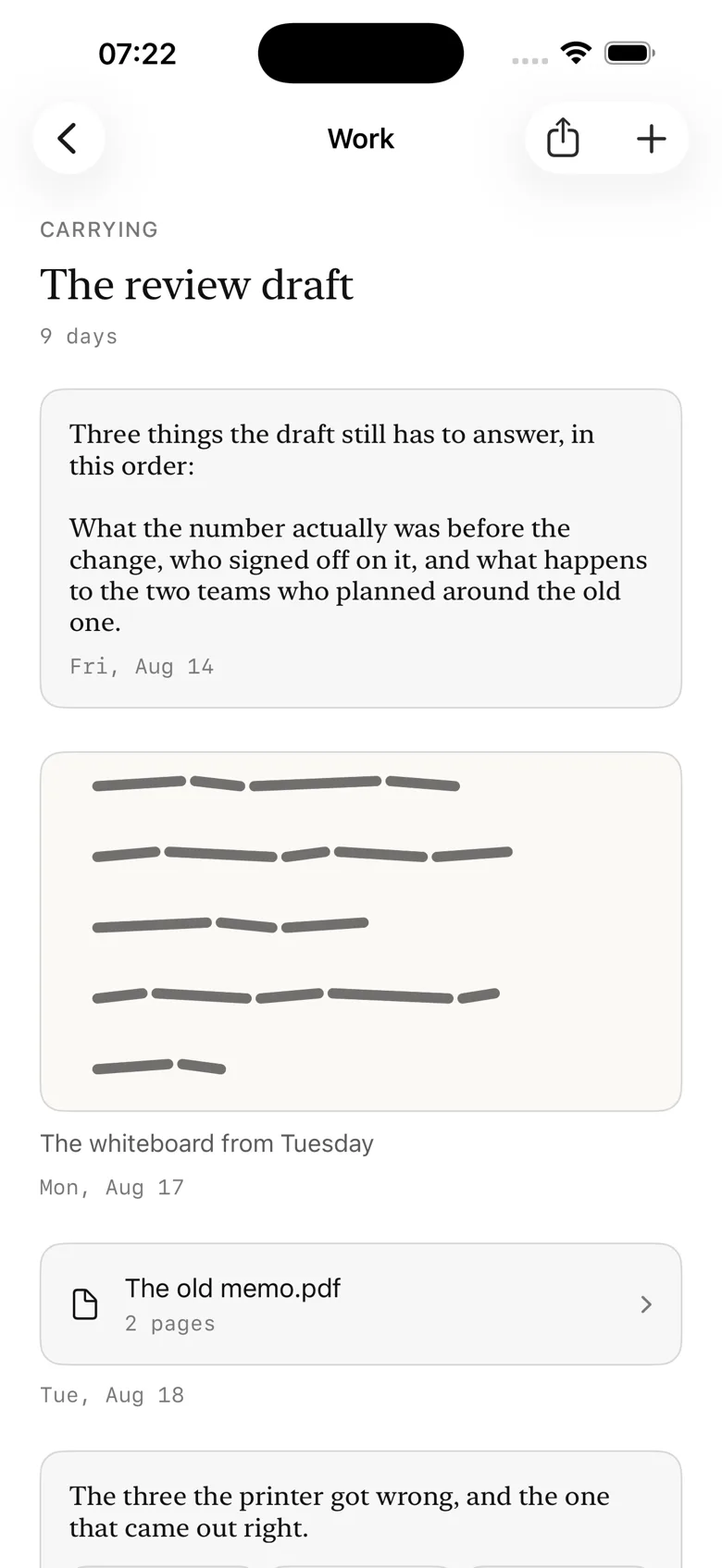
Crucially, those notes and attachments belong to the placement, not the area. When you finish or set down the work, the material goes down with it and stays preserved in your history.
And if you have ideas for what an area might do in the future, you can keep a quiet shelf of up to five "next" candidates — with no due dates, no reminders, no ticks, and no debt. An open card shows that shelf so you can pick what to carry next; a card that is already carrying something keeps the shelf tucked away in its menu so the front screen never argues with itself.
The exit sheet: where every trade happens
In a normal to-do app, adding something new is frictionless. You type it in, press enter, and the list grows longer. You never have to acknowledge what the new commitment will cost you.
In One, if a slot is already occupied, you cannot just drop something new into it. To place, what is there must leave.
The app brings up the Exit Sheet — the emotional center of the entire product.
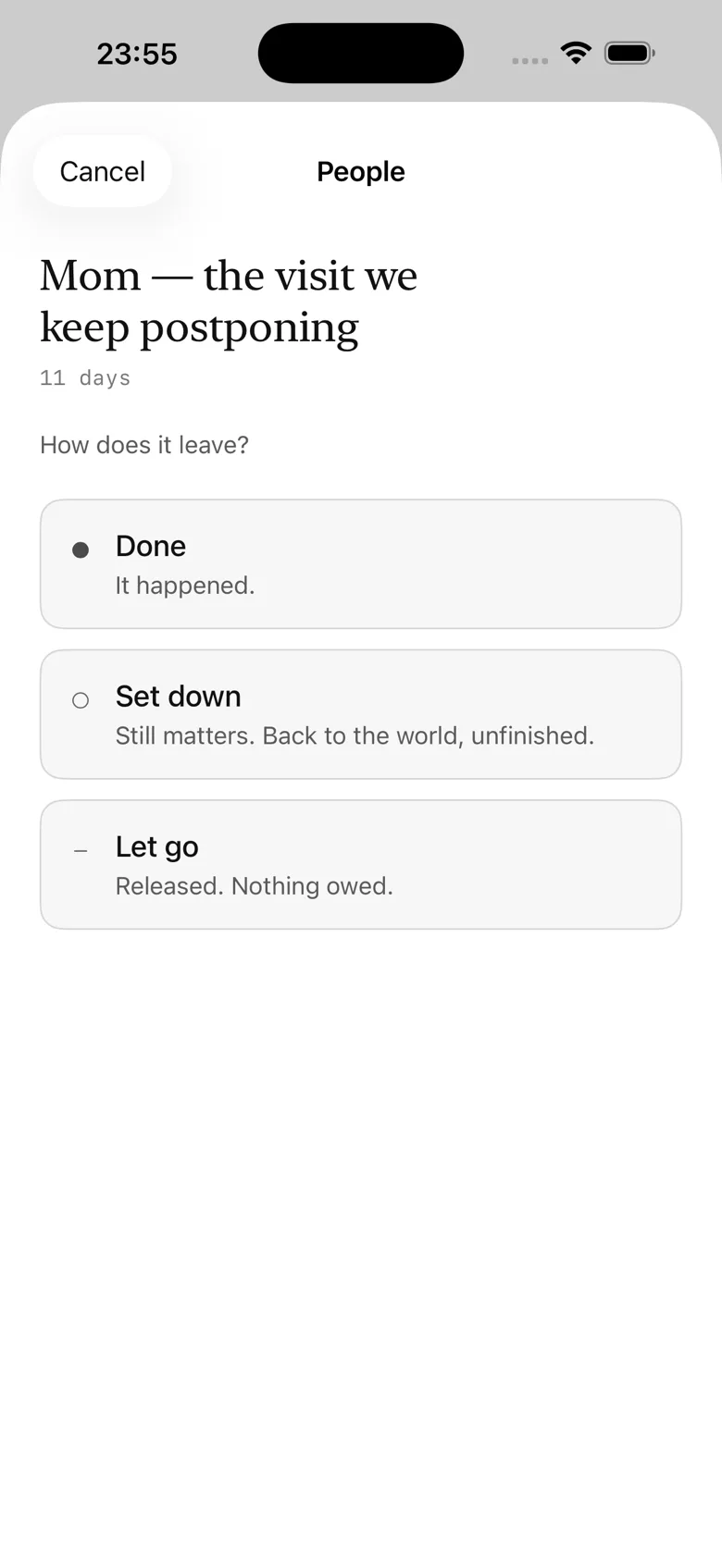
The exit sheet shows what you are currently carrying, how many days you have held it, and the newcomer you are trying to place. You have to give the old one an exit:
- Done. It happened. The memo shipped, the 30 pages were read. Recorded cleanly, without obnoxious confetti or fake gamification.
- Set down. It still matters, but you are returning it to the world unfinished. No guilt, no failure flags, no red text.
- Let go. You decided against it, on purpose, without regret. You are releasing the obligation.
Looking at Mom — the visit we keep postponing (Carried 14 days) while trying to place Organize the garage is a confrontation with reality that no to-do list has ever forced on me. You see the trade in full daylight. You cannot pretend you have infinite hours this weekend. Either Mom gets set down, or the garage waits.
That single moment of friction has saved me from more impulsive, half-baked commitments than any time-management framework I have ever tried.
Days is the only number
Look anywhere in One and you will find no streaks, no scores, no productivity percentages, and no completion bars.
The only number is days — days carried, or days standing open.
If you have carried a one in Body for 18 days, the app simply displays 18 days. It doesn't turn red. It doesn't warn you that you are "behind." Eighteen days is information, not a moral judgment. It means either the work is substantial and deserves the time, or it is too big and vague to be one thing. Deciding which is your job, not the software's to score.
And if an area stands empty? The card simply says open 6 days with a calm dashed border. An open slot is a legitimate, healthy state. In an honest life, there are weeks where you are not actively pushing a new creative idea or tackling a major reading project. One treats an open area with the exact same respect as a full one.
The weekly letter
Here is the feature that made me fall in love with the app: the letter.
Once a week, One looks at what actually moved in your areas and composes a quiet, thoughtful piece of prose just for you.
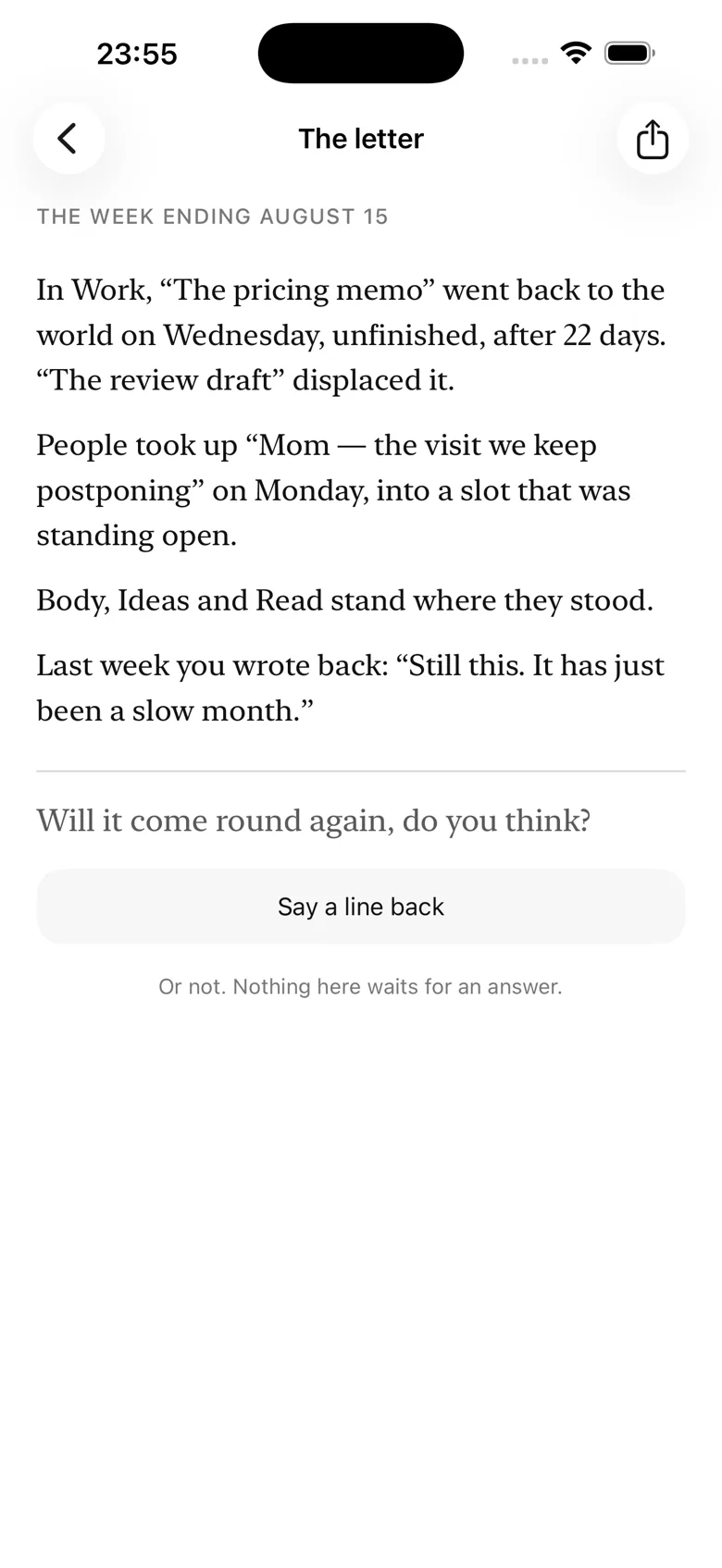
It tells you the story of your week in your own words:
"In Work, “Ship the pricing memo” went back to the world on Wednesday, unfinished, after 12 days. In People, you placed “Dinner with Sam” and carried it through Saturday..."
It doesn't lecture. It doesn't give unsolicited productivity advice. It simply reads back what you did against what you said mattered.
At the end, the letter asks one question you can answer in a single line. You type your answer, and it is sealed beside that letter forever in an archive. Next week's letter remembers what you said.
Over time, this archive becomes something rare: a quiet, unvarnished chronicle of your seasons and your choices.
The record that compounds
Every placement, every exit, and every displacement chain is kept in an append-only timeline called The Record.
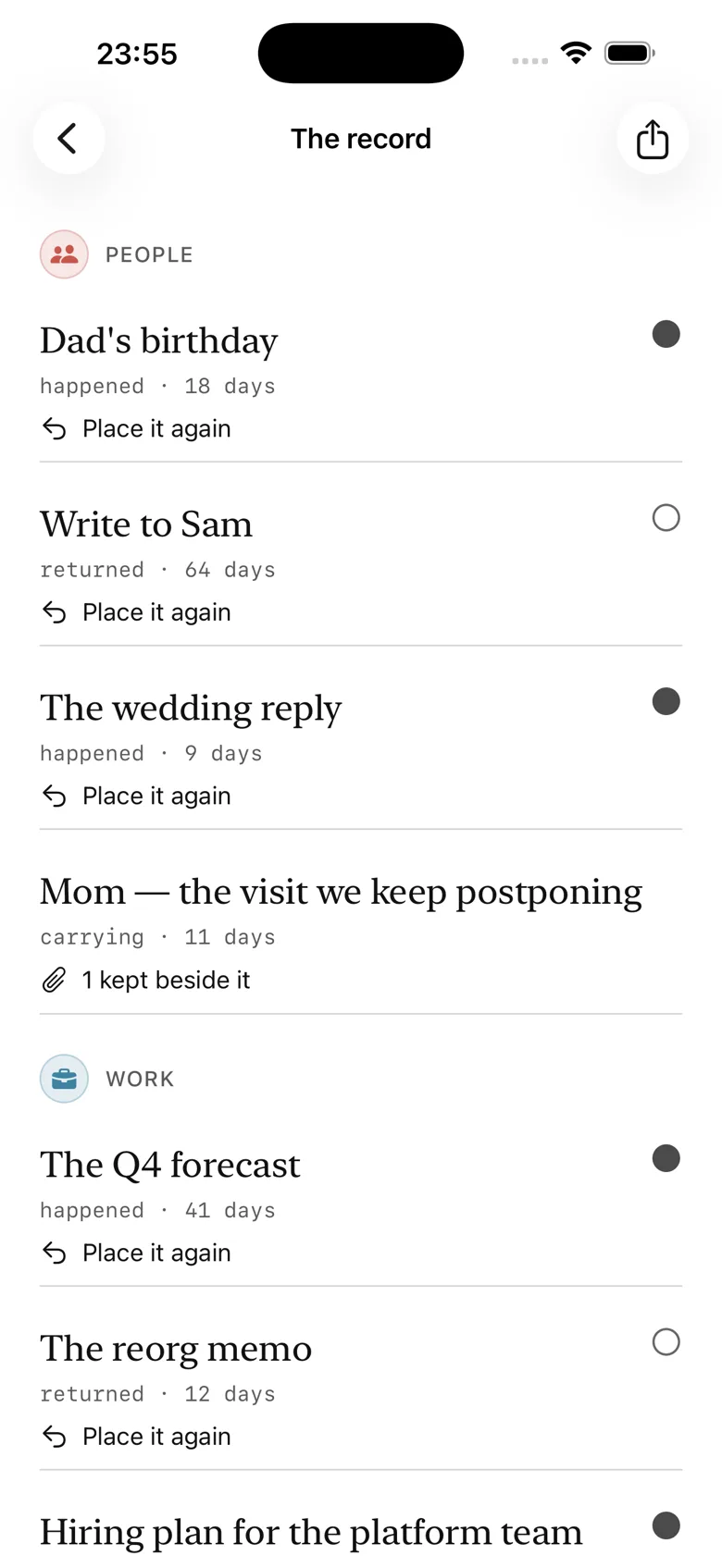
If you look back after three months, you see things no traditional task list can ever show you:
- X displaced Y after 14 days (set down)
- Read held a book for 28 days (done)
- Ideas churned through four intentions in twelve days (let go)
It is the most honest account you will ever have of where your attention actually went. And because you wrote it, the entire record and plain-text export are free forever.
For those who want deeper synthesis, the paid Patterns screen surfaces facts about your record over time: median carry days per area, which area churns most, which stands open longest, your exit mix, and the entire year visualized as a continuous ribbon.
Local-first, private, and one price
Like all apps in the HourLife family, One is built with deep respect for your privacy and your wallet:
- Everything stays on your iPhone. SwiftData on device. No account, no sign-up, no email required.
- No ads, no tracking, no third-party analytics.
- Private iCloud sync is optional, off by default, and uses your own personal iCloud container.
- Two areas with the complete mechanism — placing, exits, trades, the full record, plain-text export, and the weekly letter — are free forever.
- $4.99 one-time purchase unlocks all five areas, Home Screen and Lock Screen widgets, Patterns, and iCloud sync.
- $9.99 bundle covers One and every other HourLife mini app, now and in the future. No subscription, ever.
One is currently in App Review for iPhone.
If you are tired of to-do lists that only ever grow, and single-task apps that ignore the rest of your life, One gives you the space to carry what actually matters — one slot at a time.
To place, something must leave.